In General, K8 resources are usually created using YAML or JSON manifest.

YAML Structure:
YAML is a Indentation based and superset of JSON, which means any valid JSON file is also a valid YAML file. There are two types of structures
we mostly use.
- Map: It is key-value pair like Json Object.
#yaml
#json
apiVersion: v1
kind: Pod
{
"apiVersion": "v1",
"kind": "Pod"
}
Ex: complex
key-value structure where value act as another Map
#yaml
#json
apiVersion: v1
kind: Pod
metadata:
name: pod-nginx
{
"apiVersion": "v1",
"kind": "Pod",
"metadata": {
"name": "pod-nginx"
}
}
- List: It is sequence of values like Json Array represented using dash (-) sign.
Ex: defining
sequence of values
#yaml
#json
args:
- "HOSTNAME"
- "PORT_NUMBER"
- "9900"
args: [
"HOSTNAME",
"PORT_NUMBER",
"9900"
]
Ex: Defining
List item as Map like Json array of Objects.
#yaml
#json
containers:
- name: nginx-container
image: nginx
volumeMounts:
- name: shared-data
mountPath: /usr/share/nginx/html
- name: debian-container
image: debian
volumeMounts:
- name: shared-data
mountPath: /pod-data
{
"containers": [
{
"name": "nginx-container",
"image": "nginx",
"volumeMounts": [
{
"name": "shared-data",
"mountPath": "/usr/share/nginx/html"
}
]
},
{
"name": "debian-container",
"image": "debian",
"volumeMounts": [
{
"name": "shared-data",
"mountPath": "/pod-data"
}
]
}
]
}
Pod Manifest:
A
pod is the most basic unit of the Kubernetes cluster. It usually contains one
or more running containers. Pods are designed to be ephemeral in nature which
means that they can be destroyed at any time. Containers in a pod share the
same network and storage.

Syntax:
apiVersion: v1 # v1, apps/v1, and extensions/v1beta1
kind: Pod # Pod, Deployment, Service etc.
metadata:
name: nginx-pod
spec:
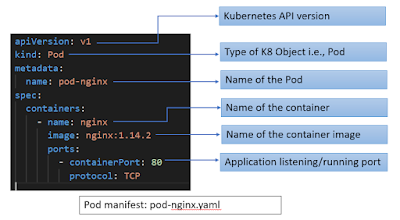
- apiVersion - version of the Kubernetes API you are using to create an object
- kind - kind of object you want to create
- metadata - It helps to uniquely identify the object, including a name, labels and optional namespace
- spec – It is used to define desired state for the object
apiVersion: v1
kind: Pod
metadata:
name: pod-nginx
spec:
containers:
- name: nginx
image: nginx:1.14.2
ports:
- containerPort: 80
protocol: TCP
Example: Creating labels on Pod
apiVersion: v1
kind: Pod
metadata:
name: pod-label-demo
labels:
environment: production
app: nginx
spec:
containers:
- name: nginx
image: nginx:1.14.2
ports:
- containerPort: 80
There are two labels i.e. app:nginx, environment:production are assigned to Pod
Running Pod Manifest:
execute following command to get running pod manifest details
// show all labels on each Deployment
> kubectl get pod pod-nginx -o yaml

Kubernetes for Developers Journey.
- Kubernetes for Developers #25: PersistentVolume and PersistentVolumeClaim in-detail
- Kubernetes for Developers #24: Kubernetes Volume hostPath in-detail
- Kubernetes for Developers #23: Kubernetes Volume emptyDir in-detail
- Kubernetes for Developers #22: Access to Multiple Clusters or Namespaces using kubectl and kubeconfig
- Kubernetes for Developers #21: Kubernetes Namespace in-detail
- Kubernetes for Developers #20: Create Automated Tasks using Jobs and CronJobs
- Kubernetes for Developers #19: Manage app credentials using Kubernetes Secrets
- Kubernetes for Developers #18: Manage app settings using Kubernetes ConfigMap
- Kubernetes for Developers #17: Expose service using Kubernetes Ingress
- Kubernetes for Developers #16: Kubernetes Service Types - ClusterIP, NodePort, LoadBalancer and ExternalName
- Kubernetes for Developers #15: Kubernetes Service YAML manifest in-detail
- Kubernetes for Developers #14: Kubernetes Deployment YAML manifest in-detail
- Kubernetes for Developers #13: Effective way of using K8 Readiness Probe
- Kubernetes for Developers #12: Effective way of using K8 Liveness Probe
- Kubernetes for Developers #11: Pod Organization using Labels
- Kubernetes for Developers #10: Kubernetes Pod YAML manifest in-detail
- Kubernetes for Developers #9: Kubernetes Pod Lifecycle
- Kubernetes for Developers #8: Kubernetes Object Name, Labels, Selectors and Namespace
- Kubernetes for Developers #7: Imperative vs. Declarative Kubernetes Objects
- Kubernetes for Developers #6: Kubernetes Objects
- Kubernetes for Developers #5: Kubernetes Web UI Dashboard
- Kubernetes for Developers #4: Enable kubectl bash autocompletion
- Kubernetes for Developers #3: kubectl CLI
- Kubernetes for Developers #2: Kubernetes for Local Development
- Kubernetes for Developers #1: Kubernetes Architecture and Features
Happy Coding :)
Comments
Post a Comment